Pages

Showing posts with label Computers. Show all posts
Thursday, January 25, 2018

How to Build a Gaming PC (Final steps)

These are the last three steps to building a gaming PC. Like the rest of the steps, these are fairly simple.

Plugging Stuff In:

In this step all you have to do is plug things into each other. This mostly depends on your mother board layout, use the mother board manual to help you find all the slots.
First, plug the power supply into the motherboard. Then plug the fans into the power supply.

Inserting a Graphics Card:

Inserting the graphics card is simple, insert the card into the designated slot in the mother board. Then, like everything else in the computer, plug it in to the power supply.

Powering up and trouble shooting:

This is the last step to building a PC. You just turn on your computer and set up everything. Create all the accounts you want on the computer and install all the programs you want on the computer.

Now you're done! If you have followed these simplified steps, you've built a gaming PC. Now you can tell your friends all about it! If you want a more detailed guide just follow this link--->http://www.pcgamer.com/how-to-build-a-gaming-pc-a-beginners-guide/
If you have any questions ask away in the comments below.
Tuesday, January 23, 2018

How to Build a Gaming PC (Continued)

In this blog I shall explain the next three steps to the building process.

Installing a Power Supply:

Take your power supply and implement it in the designated location (near the back). Place the fan on the power supply next to the vent at the back of the computer case. Screw the screws to connect the power supply to the case.

 Insert Hard drive/SSD(Solid State Drive):

Take your hard drive and insert it into one of the hard drive trays in the computer. Or take your SSD and screw one of trays from the case on the back of it. Then, screw on the SSD onto the back of your computer case.

Plugging in the Drives:

Take the SATA data cable and SATA power cable and plug them into the SSD and/or the hard drive. Then connect the other ends of those cables to the designated slot on the mother board.

That is all for today's blog, in my next one I will finish describing how to build a gaming PC. 
Monday, January 22, 2018

How to Build a Gaming PC (Building Continued)

In this tutorial I will go over the next three parts to building your very own gaming PC.

Inserting RAM:

If you don't already know, RAM stands for Random Access Memory.
After you are done attaching the cooling system for the CPU, you inset the RAM sticks into the designated slots on the motherboard. Unlock the slots by pushing the tabs on the side of the slots.

Snapping in the I/O shield:

Open up the main cavity of the computer case, and take the I/O shield (a shiny metal piece with holes) to the designated slot in the back of the computer.

 Installing the Motherboard:

Unscrew the mother board stand offs then place your mother board in the designated location inside the case.

That is all for now. Next time I will describe the next three steps to building your gaming computer. This blog shares data from the same site I used in my last blog. 
Wednesday, January 17, 2018

How to build a gaming PC (Prices)

When picking out parts for your gaming computer, you want to know the specs of the computer you want. Do you want good graphics, good fps (frames per second), big storage? Then that will cost more. You want to find the perfect balance between price and quality.

Finding the right price

An important part to buying a computer is finding the right price. What I mean by "the right price" is how much you are willing to spend on something. Use the internet to find good prices. Use the website of the tech store you want to go to if you want to buy the parts in person. And use Amazon if you want to order online, Amazon tends to have good prices for good quality. But, on the internet the wait for a specific part (or parts) is longer than just going to the store, and you have to pay shipping and handling. Moral of the story, find something not too expensive.

Finding good quality 

 Good quality is important for finding parts, because you want your computer to be the best. For good sound quality, get a sound card not implemented onto the motherboard already. For good graphics quality, get a graphics card that has 1080p graphics. For fast processing, get large amounts of RAM (Memory). If you have a lot of games, get large amounts of storage (2 terabytes or more). These are only some suggestions, but all of this is up to your own personal judgment. But, companies like MSI, Logitech, and Ironside have good quality parts, and are relatively cheap.

In my next blog/tutorial, I shall begin to piece the computer together starting with the mother board and the processer.
Monday, January 15, 2018

How to build a gaming PC (Planning: Parts)

 This is a step-by-step tutorial on how to build your own desktop, gaming PC. If you don't know what a gaming PC is. It is a desktop computer (or laptop) that is specific for gaming, meaning it has higher quality than Macs and Laptops.

Finding the Right Price

Before you get all the parts for you computer, you have to set a price range. Most of you could get a decent computer for a good price, but, sometimes, it's cheaper to make your own. So figuring out what you want and how much you want to spend is a good idea. Use the internet (if you have access to it) to search how much each part costs. But, buy your parts at a store to make sure you are not getting scammed.

Assemble all the parts (bringing it all together)

Get all the parts required to build your personal computer. These include: a processor, a graphics card, Graphics Processing Unit (GPU), a power supply (battery), a mother board, memory, storage, and a computer case.
You will also need a screw driver (magnetic) for the case. You will also need zip ties to hold lose wire together. Also, you will need thermal paste and a grounding strap. If you don't know, a grounding strap is to prevent static shock from blowing up the computer.
If you want better sound quality, buy a separate sound card for the mother board, everything will sound better.


In my next post I'll talk about where to start on building your very own gaming PC. If you have questions on this post ask in the comments below.

Bibliography

Simple. “Here Are All the Parts You'll Need to Build Your First Gaming PC.” Simple, Simple, 16 Sept. 2015, www.simple.com/blog/how-to-build-a-gaming-computer
Wednesday, November 29, 2017

Calculating using Python

Calculating using Python 3.6.3

Python is an easy to learn, powerful programming language. It has efficient high-level data structures and a simple but effective approach to object-oriented programming. Python’s syntax and dynamic typing, together with its interpreted nature, make it an ideal language for scripting and rapid application development in many areas on most platforms. Today I will show how to use Python as a Calculator and show some interesting features as well.
"The Interpreter (software) acts as a simple calculator: you can type an expression at it and it will write the value. Expression syntax is straightforward: the operators +, -, * and /  and parentheses (()) can be used for grouping," (Guido Van Rossum 3.1). Here is a line from the book showing each of these expressions.
Here are my expressions
For any expression written that would have a decimal throughout the solving of the expression or the answer itself. They will always return a floating point number. 

I would suggest practicing the basics as when you learn them you can interpret more advanced expressions for example: I turned 25 Kilograms into how much it weighs in stone!

My question for all of you guys is "Have you tried any computer languages? which ones?" 

Michaels, Evan. Rossum, Guido Van. Learning Python. Python Software Foundation, 2001-2017


Tuesday, January 31, 2017

Python: Modules and TurtleWorld

 Most programming languages include modules in them, like Python. “Modules [are] a file that contains a collection of related functions” (Downey 24). For example, there is already a built-in module in Python called “math”. The math module imports lots of functions into the program so that you can reference them in your code. An example of this would be when you import the math function, you can access difference new functions such as square roots, pi, and logarithms.


In the book “Think Python, Chapter 4” it tells to download a package called “Swampy”. Packages are just a collection of modules that you can install, since modules are collections of new functions, packages are in essence adds lots of new functions into the programming language (Downey 37). In Swampy there is a module that is called TurtleWorld. Using this you can create a “TurtleWorld” which is a window where a “Turtle” will draw what you tell it to draw. For example in the code below, the first line imports all the functions from the TurtleWorld module from the Swampy package. Then the next lines in the script make a TurtleWorld called world, and a Turtle called bob. Using this we can use bob and the TurtleWorld to draw a square and other shapes as we want. The “fd” function moves the Turtle “bob” forward 100, and the “lt” function turns him to the left. Repeat this 3 more times and we have a square.


From this experience, I was surprised the capabilities of Python and what it can accomplish, specifically with the TurtleWorld modules.
 Question: What are some things that you were surprised you can accomplish?
Downey, Allen B. Think Python: How to Think like a Computer Scientist. Sebastopol: O'Reilly Media, 2015. Print
Saturday, January 28, 2017

Python:Functions

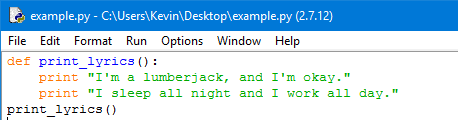
In Python and in almost all programming languages there are these commands called functions. “In the context of programming, a function is a named sequence of statements that performs a computation” (Downey 23). This is very useful in programming since if there is a repetitive sequence of code that we want to execute, instead of repeating the same lines over and over again we can make a function for that sequence of code so that we can call on it when we need to. In Python, there are already many different functions that are built into the program. However, there is also a way where we can add a function into our script. This is called a function definition. When we define a function and its sequence of code that executes whenever the function is being used (Downey 25).   
An example of this is


In the code, there is a keyword called “def”. This means that this is a function definition, the keyword "def" defines the line of code as a function. The text that is next to the “def” is the name of the function. In this example, the name of the function is called “print_lyrics”. Finally, the text under it is what the function contains and what it will do when it is executed. In this example, this function will print out the lines. Finally, the line of code at the end of the function executes the function (print_lyrics()). (Downey 26).
“I’m a lumberjack and I’m okay.”
“I sleep all night and I work all day.”
 Using this new found knowledge we can write a program that can draw a grid.
In this program, I made two functions that printed out a line of the grid. Then making a final function I printed out the grid.


Question: When have you found yourself having to do something repetitive?

Downey, Allen B. Think Python: How to Think like a Computer Scientist. Sebastopol: O'Reilly Media, 2015. Print.
Sunday, January 22, 2017

The Final Steps to Making a Working Computer

The Final Steps

Once the computer is up and running you are going to need to upload your operating system, in my case I was using Windows 10. Before you upload windows you have to check the computer BIOS. According to Gower the BIOS is where you can configure different drives (Gower 81). But the BIOS is also used to check on your systems, making sure your fans are working, and that your cpu is not over-heating.
Nowadays most computer operating systems are downloadable from the internet, so you would need a blank USB flash drive with enough space to get the application online then to load it up on your computer. Once it is uploaded you format your hard drive how you want, "The newest versions of Windows,..have a way to partition and format the hard drive" (Gower 83).  Partitions the drive is like splitting it into multiple parts, maybe ones your main drive and the other is a backup. Once, you have all this set up your computer is ready to be used; however, you can also upload your graphics card to optimize for gaming, and/or your motherboard to have better control over your systems. Either way I finished my computer. And I feel like building another in the future.
If you have ever made a computer, what makes you want to build another, or to not build another?
Gower III, John, How to Build a Computer (For Beginners) Eighth Edition, Copyright 2011

Tuesday, January 17, 2017

Starting Up The Computer

Starting Up The Computer

There are many wires to set up, getting that power supply connected to everything properly is very important. Without power the computer can't turn on, making the power supply very important. Making sure everything is plugged in securely is very important Gower says you should here a click when you plug the power into the motherboard (Gower 64). When powering up the computer sometimes nothing happens, when this happens you have to, "Double check your power connections from the power supply to the motherboard and try again. Double check to make sure your power switch cable is installed correctly to the motherboard" (Gower 67). 
When I was building my computer at first it wouldn't turn on, at first i thought I had a defective component, Gower says that if the fan on the power supply isn't spinning then the power supply might be defective (Gower 67). I learned that the problem was that my the wires that connect the power and reset button to the motherboard weren't aligned correctly, thus when I hit the power button nothing happened. Once I got the computer up and running I just needed to upload windows, and my drives.
When building your computer, was there a step that you messed up on, or a set of wires you didn't plug in correctly?
Gower III, John, How to Build a Computer (For Beginners) Eighth Edition, Copyright 2011


Sunday, January 15, 2017

Setting Up The Motherboard

Setting Up The Motherboard

The first thing that I learned while building my computer; do not rush, I rushed and I put in the motherboard to soon, this did not wreck the computer, but it made it harder to do other steps. John Gower says you place the motherboard in after you place the major components onto the motherboard (Gower 58). With the motherboard in first I had to reach into the case to place each part on the motherboard. One thing that is important to note is that was said in the book was that, "Every motherboard and case is different." (Gower 60). This makes it show that the book couldn't help me through some phases, as it could not accurately describe where to place every little thing.
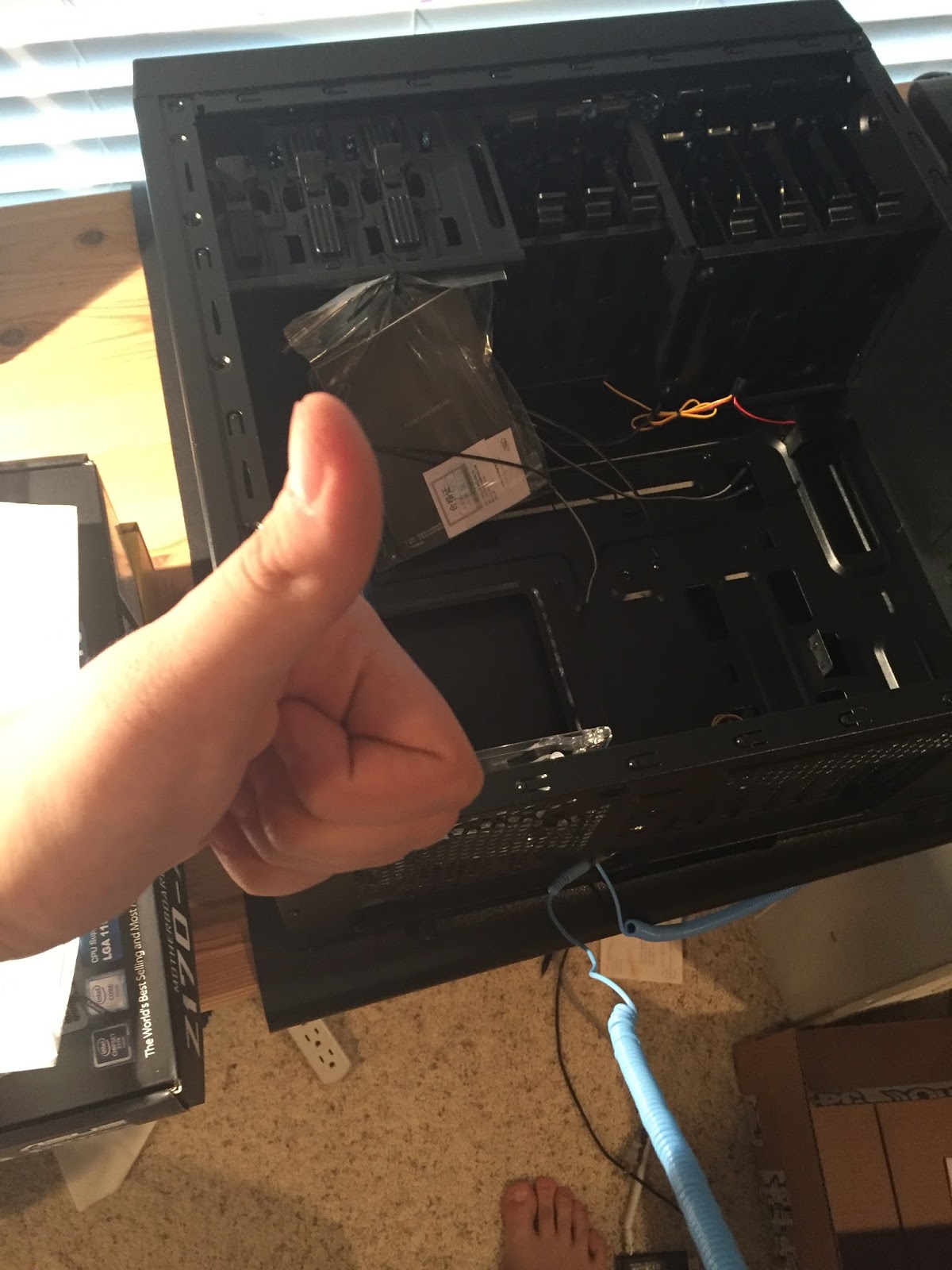
 Once I got all the major components on the motherboard, I had to connect the power supply and the case wires. This was the most frustrating part for me, and I almost had to give up entirely before I figured out what to do. The main problem arises from that every motherboard and case are different, thus the book can't help, not even the internet could help, I had to use the confusing motherboard manual and the small labels on the power supply and case wires. With all the small wires you have to connect them to the correct part and make sure it is securely connected otherwise the computer won't work. I figure it out though, and got everything connected correctly. One thing the book never goes through is wire management as seen from the image below.
For those who have built or are building computers, what is/was the most frustrating thing to do?
Gower III, John, How to Build a Computer (For Beginners) Eighth Edition, Copyright 2011.


Saturday, December 31, 2016

Choosing and Buying the Best Parts

Choosing and Buying the Best Parts


Choosing the best parts involves a combination of utility and budget. You do not want poorly made cheap parts that don't work well, but you do not want to spend your money on over-priced parts. The best way to keep track of the parts you need is to, "Write down the lists of computer hardware and computer software on a piece of paper with spaces in between." (Gower 10). This allows you to keep track of all your parts and their prices and where to get them.

When looking at prices you need to take in account the quality of the part and your overall budget. John Gower says it is important to know how much you want to spend on parts. I have a budget of $1,000. You do not want to spend too much on a part which is necessary most of the time, but don't always buy the cheapest item. I found a great site to find your parts called pcpartpicker.com, which allows you to look at reviews and compare prices of parts on different sites, so you can find which site sells that particular part for the cheapest price. 

When looking at quality you have to be the judge in the end. You can use reviews and any prior knowledge you have on the parts to judge which is best for you and the computer you want. Since this is my first time making a computer I am just building a basic computer that can use the internet, so I am just going for basic reliable parts nothing that is extremely high powered. While writing this most of my parts have arrived in and just need some final preparation before I start building.
What would your budget be for purchasing parts for a new computer?
Gower III, John, How to Build a Computer (For Beginners) Eighth Edition, Copyright 2011.

Wednesday, November 30, 2016

Python-The Programming Language

Python is a programming language that is meant as an introduction to programming. It is classified as a high level language like some other programming languages such as C, C++, and Java. There are also low level languages, generally computers can only run low level language, but writing in these languages can be time consuming and hard. Writing in high level languages however can take less time to write and be simpler to read. After writing these high level languages there has to be an interpreter that converts this high level language into low level language for the computer to understand. This is a small disadvantage compared to the advantages that you get from the high level languages (Downey 1-2). Based on all of these factors Python is an excellent first programming language since it is very simple to read and understand compared to other languages and can be very powerful at the same time.

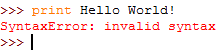
            When starting to learn how to program the traditional first program is the "Hello World!” program. This program displays the worlds “Hello World!” into the display. 

To write this program in Python it looks like this


However, when I first typed in the code I got results that looked like this.


This is because, I didn’t have apostrophe marks surrounding “Hello World!” this lead into an error classified as syntax error. “Python can only execute a program if the syntax is correct; otherwise, the interpreter displays an error message. Syntax refers to the structure of a program and the rules about that structure. For example, parentheses have to come in matching pairs, so (1+2) is legal, but 8) is a syntax error (Downey 4).” This made me realize what I did wrong and made me reevaluate my mistakes and learn from them. "The single most important skill for a computer scientist is problem solving. Problem solving means the ability to formulate problems, think creatively about solutions, and express a solution clearly and accurately (Downey 1).” While what I demonstrated above isn’t the most difficult of problems, it shows that problem solving is going to be a key skill for programming. This skill overall is going to be an important skill in life, as you might need to use problem solving in everyday scenarios.
Question: What are somethings that you do every day that require problem solving?

Downey, Allen B. Think Python: How to Think like a Computer Scientist. Sebastopol: O'Reilly Media, 2015. Print.

How to Get Ready to Build to Build Your New Computer

How to Get Ready to Build Your New Computer


Building a computer can be a difficult task, and something that I have wanted to do for a long time. There are some things that anyone wanting to build a computer needs to know and do. The first thing and possible the most important is knowing what type of computer you want. John Gower says when you want to build a computer the most important thing to ask yourself is what type, whether want a high powered computer made to play video games, one to surf the internet or one to do work on (Gower 8). Then you need to be able to set a budget(because these computer are not cheap). While setting your budget you should start looking at the parts you need and compare prices.

Once you decide what you need, there is another important task to do before you start. Prepare your work space. A large desk is the best spot where you can have all your parts in one spot, or a kitchen counter works as well. Large, flat, elevated space is what you need. "You want to avoid working on the ground especially the carpet because of the threat of static electricity." (Gower 28). To make sure you work effectively you want a well lit area where you can set up all your parts.

What type of computer would suit your needs the best and why?
Gower III, John, How to Build a Computer (For Beginners) Eighth Edition, Copyright 2011.