Pages

Showing posts with label Hua Kevin. Show all posts
Tuesday, January 31, 2017

Python: TurtleWorld and Polygons

In this blog post, I will be continuing on with the TurleWorld and seeing if I can make different shapes and objects using my previous knowledge and guidance from the book. For example, in the first exercise, it wants me to simplify my coding by adding a “for” statement. “A for statement is sometimes called a loop because of the flow of execution runs through the body and then loops back to the top” (Downey 39). In this case, I used the “for” statement to simplify and make my square coding not as repetitive. 


In this example, I had the line of code that I used in the last post to repeat 4 times, instead of me typing it out 4 times. In the next exercise in Think Python. It wants me to fiddle around with the angle of the turns that the turtle can make. In this case, by making the polygon a function, I can change around what I can input in its parameters to change the shape that I make with the Turtle. In the example that Think Python gives me, the first line of code defines the function “polygon” to have the variables, t, n, and length. Then in the function of the polygon, there is a variable called angle, which calculates the exterior angle of the polygon. Then there is a loop statement again that moves the turtle (t) in a certain length, and then turns the turtle left in a certain angle. The last line of the code executes the function “polygon” with 7 sides with each side length being 70 (Downey 39).


During the next examples in Think Python there was also a challenge to program it so that the turtle draws a circle. While I tried my best to figure it out I eventually ran out of time and gave up to be able to post on the blog on time.

Question: When have you given up on something because it was too difficult?


Downey, Allen B. Think Python: How to Think like a Computer Scientist. Sebastopol: O'Reilly Media, 2015. Print

Python: Modules and TurtleWorld

 Most programming languages include modules in them, like Python. “Modules [are] a file that contains a collection of related functions” (Downey 24). For example, there is already a built-in module in Python called “math”. The math module imports lots of functions into the program so that you can reference them in your code. An example of this would be when you import the math function, you can access difference new functions such as square roots, pi, and logarithms.


In the book “Think Python, Chapter 4” it tells to download a package called “Swampy”. Packages are just a collection of modules that you can install, since modules are collections of new functions, packages are in essence adds lots of new functions into the programming language (Downey 37). In Swampy there is a module that is called TurtleWorld. Using this you can create a “TurtleWorld” which is a window where a “Turtle” will draw what you tell it to draw. For example in the code below, the first line imports all the functions from the TurtleWorld module from the Swampy package. Then the next lines in the script make a TurtleWorld called world, and a Turtle called bob. Using this we can use bob and the TurtleWorld to draw a square and other shapes as we want. The “fd” function moves the Turtle “bob” forward 100, and the “lt” function turns him to the left. Repeat this 3 more times and we have a square.


From this experience, I was surprised the capabilities of Python and what it can accomplish, specifically with the TurtleWorld modules.
 Question: What are some things that you were surprised you can accomplish?
Downey, Allen B. Think Python: How to Think like a Computer Scientist. Sebastopol: O'Reilly Media, 2015. Print
Saturday, January 28, 2017

Python:Functions

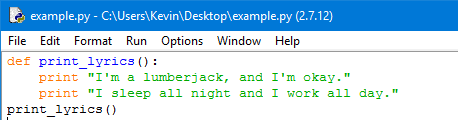
In Python and in almost all programming languages there are these commands called functions. “In the context of programming, a function is a named sequence of statements that performs a computation” (Downey 23). This is very useful in programming since if there is a repetitive sequence of code that we want to execute, instead of repeating the same lines over and over again we can make a function for that sequence of code so that we can call on it when we need to. In Python, there are already many different functions that are built into the program. However, there is also a way where we can add a function into our script. This is called a function definition. When we define a function and its sequence of code that executes whenever the function is being used (Downey 25).   
An example of this is


In the code, there is a keyword called “def”. This means that this is a function definition, the keyword "def" defines the line of code as a function. The text that is next to the “def” is the name of the function. In this example, the name of the function is called “print_lyrics”. Finally, the text under it is what the function contains and what it will do when it is executed. In this example, this function will print out the lines. Finally, the line of code at the end of the function executes the function (print_lyrics()). (Downey 26).
“I’m a lumberjack and I’m okay.”
“I sleep all night and I work all day.”
 Using this new found knowledge we can write a program that can draw a grid.
In this program, I made two functions that printed out a line of the grid. Then making a final function I printed out the grid.


Question: When have you found yourself having to do something repetitive?

Downey, Allen B. Think Python: How to Think like a Computer Scientist. Sebastopol: O'Reilly Media, 2015. Print.
Saturday, December 31, 2016

Python-Interactive Mode and Script Mode

       In Python, there are two ways to code, one way in Interactive Mode and another way in Script Mode. While there are advantages to each both of them, there can be some disadvantages too, this is why you need to utilize both of them to be successful. The advantages to using Interactive mode is that you can test out bits of code to see if they work before you put them into your script. In script mode you can store multiple lines of code so that you can execute it all at once. There are also differences when you are coding in interactive mode and script mode that can also be confusing (Downey 17).
For example:

If you code this into the interactive mode then the output would show up under it
X=126
X*420


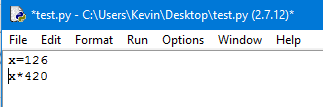
However if you type this exact code into script mode the output would be different


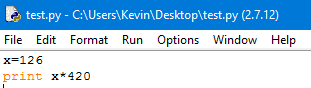
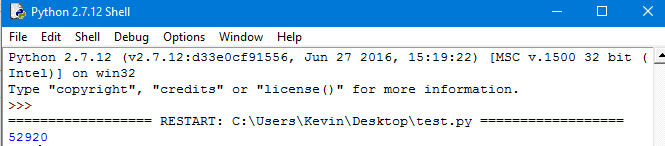
As you can see on the left side is the script, and when executed there was no output on the right, or the shell. This is because we didn’t tell Python to print out the output which is sometimes confusing as stated before. “But if you type the same code into a script and run it, you get no output at all. In script mode an expression, all by itself, has no visible effect. Python actually evaluates the expression, but it doesn’t display the value unless you tell it to:” (Downey 17).


Since we added the print command in the script there was a visible output like in the interactive mode.

Question: What are some other scenarios where you need more than one resource to be successful?

Downey, Allen B. Think Python: How to Think like a Computer Scientist. Sebastopol: O'Reilly Media, 2015. Print.